For Authors
Submission
When submitting a manuscript to the journal, authors must confirm its compliance with all the criteria listed below. Non-compliance with these conditions may lead to the article being returned for revision or rejected.
- The manuscript must correspond to the scientific subject matter of the journal "Education: Modern Discourses".
- The manuscript must be original, not previously published, and not under consideration in another publication.
- The author is responsible for the novelty and accuracy of the results, as well as the correctness of the list of co-authors who made a significant intellectual contribution to the preparation of the submitted work.
- The author guarantees the proper formatting of bibliographic references to all used fragments of others' works or statements by other authors. Excessive borrowing and plagiarism in any form are strictly unacceptable. Together with the manuscript, the author provides a report on the plagiarism check, which confirms the level of uniqueness of the text and contains an analysis of source usage and partial overlap with other scientific works.
- The author certifies the absence of a conflict of interest and confirms they have familiarised themselves with the Author Agreement. All materials must comply with the editorial board's requirements regarding format and content.
ARTICLE FORMATTING REQUIREMENTS
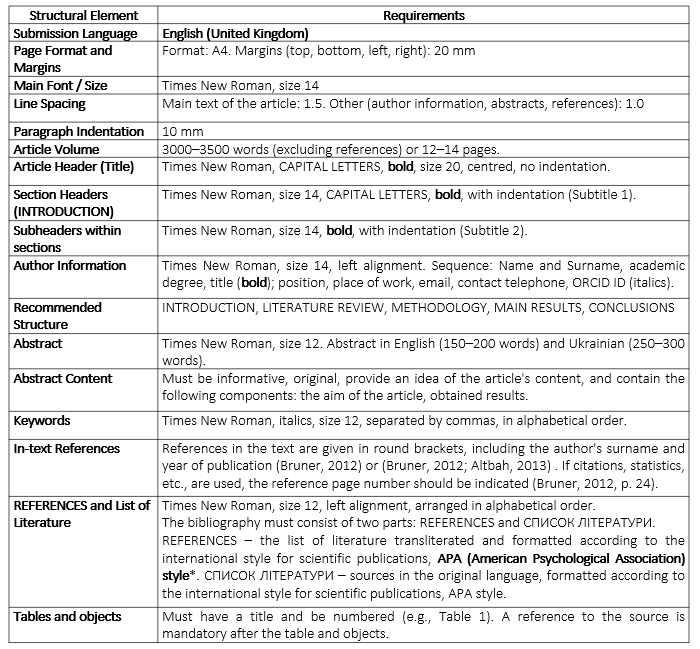
* Samples for formatting can be viewed here.
Instructions for the Author
To submit articles to the journal and track their status, the author must authorise as a registered user.
- The author must log in to the journal system. On the "For Authors" page, familiarise yourself with the article formatting requirements.
- In the MS Word text editor, the author must format the manuscript according to the article formatting requirements and save the file in DOC or DOCX format.
- Go to the "User’s Folder" page and click on the link [new submission].
5 Steps for Submitting an Article to the Journal
Step 1: Starting the Submission: Select the journal section and submission language, then tick the boxes to confirm compliance with all technical requirements.
Step 2: Uploading the Submission: Upload the manuscript file using the [Browse ...] button, and click [Upload]. Click the [Save and Continue] button.
Step 3: Entering Metadata: Provide basic information about the article (title, abstract, keywords, bibliography for the article) by filling in the appropriate fields in detail. Note: After filling out the form in Ukrainian, select English from the language list and enter the information in English. This will allow the system to automatically process data and ensure indexing by scientometric databases.
Step 4: Uploading the Author Agreement: Upload the author agreement file using the [Browse ...] button, and click [Upload]. Click the link << Back to accompanying files.
Step 5: Confirmation: Complete the submission process by selecting [Confirm submission].
Submission Status
To check at which stage of the editorial and publishing process the submission is, the author should do the following: "User’s Folder" → "Author" → "X Active" → Status.
Status Options:
- In progress: The author has not completed the submission process; to continue, click on the submission title.
- Submissions awaiting acceptance: Formatting check is expected.
- Reviewed: The manuscript file has been sent to the editor or reviewer.
- Is edited: The manuscript has been accepted, and its publication is expected.
- Archived: The manuscript has been rejected.
Returning a Revised Article
To return an article to the system that has been revised following editors' comments, the following steps should be taken:
- User’s Folder → Author.
- In the status field, click "Reviewed".
- Go to the " Unload author's version" field
- Click [Browse ...], then [Unload].
Please notify the editor about the submission of the new version!